Find a project you have accepted as a supplier
Overview
After accepting a project invitation, you can find and access your assigned project in several ways.
When to use it
-
You accepted a project invitation but cannot find the project in your account
-
You want to access a project using the invitation email
-
You want to search for a specific project in your task list
How to use it
Option 1: Use the invitation email
When you receive a project invitation, Smartcat sends an email notification containing the project name, document name, client name, word count, and language pair.
-
Open the invitation email
-
Click Go to task
Result: You are taken directly to the project.
Option 2: Use the in-platform chat
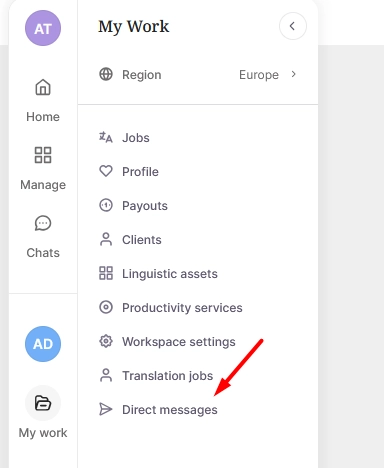
Every project invitation is also sent as a message in Smartcat Chat, labelled with the client's name. Both the invitation message and your acceptance confirmation contain a link to the project.
-
Open Direct messages in the left sidebar
-
Find the conversation with your client
-
Click the project link in the message
The project opens directly.
Option 3: Search in My Tasks
-
Go to My Tasks in the sidebar
-
Click the filter icon (funnel icon) in the top right corner
-
Select Project from the filter options
-
Enter the project name in the filter field
The matching project appears in the task list.
FAQs
I accepted the invitation but can't find the project anywhere. What should I do?
Check that you are logged into the correct Smartcat account, the one that received the invitation, and that you are currently on the correct server. If the issue persists, contact support@smartcat.ai.
The invitation email link isn't working. What should I try?
If you see the "Access denied due to insufficient rights", then check the Troubleshooting: access denied or insufficient rights error. Otherwise, try accessing the project through My Tasks (Option 3 above), or through Smartcat Chat (Option 2). If you still cannot access the project, contact support@smartcat.ai with the project name and your account email.
Want to learn more?
See how Smartcat can transform your localization workflow.
Still need help?
Our support team responds within one business day.