Export XLIFF files from Smartcat
Overview
You can export any Smartcat document as an XLIFF file and work with it using other tools. This is useful when a project participant does not have a reliable internet connection and wants to work offline, when a team member prefers another CAT editor, or when you want to use a third-party tool to run QA checks.
📌 Files exported from Smartcat follow the XLIFF 1.2 standard.
💡 Smartcat integrates with some QA tools, which removes the need to export XLIFF files.
Export XLIFF files
-
On the project page, select the documents you want to export as XLIFF files
-
In the Export menu, choose XLIFF under Special formats
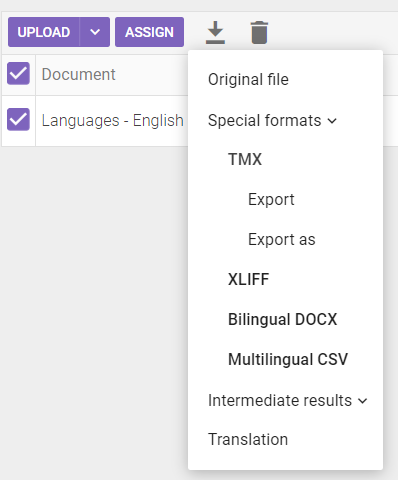
You can now work with the exported files using any external tool that supports the XLIFF format.
Import XLIFF files back into Smartcat
-
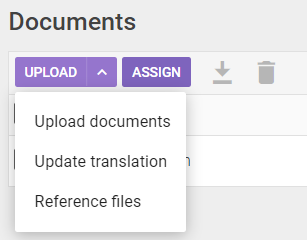
On the project page, click the arrow to the right of the Upload button
-
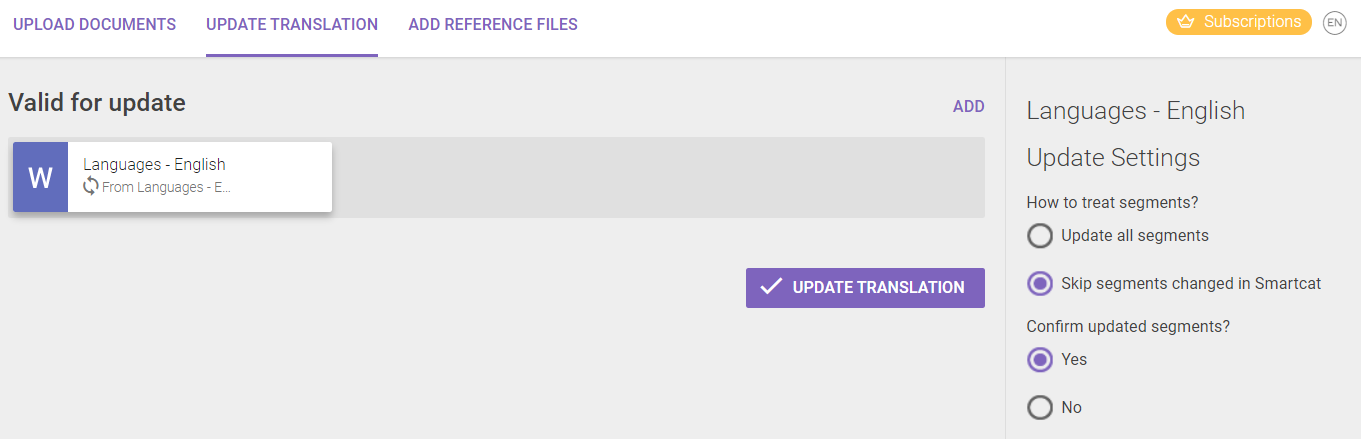
Choose Update translation
- In the wizard, choose your import settings. If any segments changed in Smartcat while you edited the XLIFF file in an external tool (common in collaborative scenarios), decide whether to overwrite the changes (Update all segments) or keep them (Skip segments changed in Smartcat). You can also confirm all updated segments and save them to the Translation Memory (TM), or keep them unconfirmed to check them in the CAT editor later
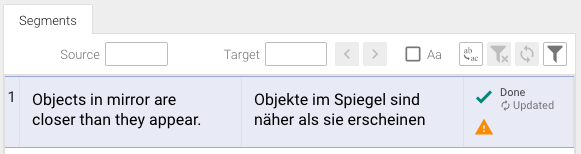
After the import completes, the updated segments are marked as Updated in the CAT editor.
FAQs
What XLIFF standard does Smartcat use for exports?
XLIFF 1.2.
Why would I export a document as XLIFF instead of working in Smartcat directly?
Common reasons include working offline, using a different CAT editor you prefer, or running the file through a third-party QA tool.
What happens if segments were edited in Smartcat while I was working on the exported XLIFF file elsewhere?
When you re-import the file, you choose whether to overwrite those Smartcat changes (Update all segments) or preserve them (Skip segments changed in Smartcat).
Can I control whether re-imported segments come back as confirmed or unconfirmed?
Yes. During import, you can confirm all updated segments and save them to the Translation Memory, or leave them unconfirmed so you can review them later in the CAT editor.
Do I still need to export XLIFF for QA if Smartcat has QA tool integrations?
Not necessarily — Smartcat integrates with some QA tools directly, which can remove the need to export XLIFF files at all for that purpose.
Want to learn more?
See how Smartcat can transform your localization workflow.
Still need help?
Our support team responds within one business day.