Glossary permissions and the term approval workflow
Overview
Smartcat's glossary includes a built-in permissions and approval system that controls who can add, edit, and approve terminology. This article explains how the system works and how to manage term suggestions from linguists.
Who can do what
Glossary access is governed by role-based permissions. The following roles have different levels of access:
-
Administrators and project managers can add, edit, approve, and delete terms
-
Users, in-house linguists, and market freelancers can suggest terms for review
You can also create custom roles that have permissions for glossaries. For example, you can provide the custom role with the permissions to edit and add terms to glossaries for a specific client.
📌 The user must be logged into the workspace where the glossary is located to use these permissions.
How the term suggestion workflow works
When a linguist or user suggests a term, it does not appear in the active glossary immediately. Instead:
-
The suggested term is placed in the Suggested Terms tab within Linguistic Assets
-
A user with the permissions to manage the glossary approves the suggestion
-
Approved terms become active in the glossary
Accessing Suggested Terms
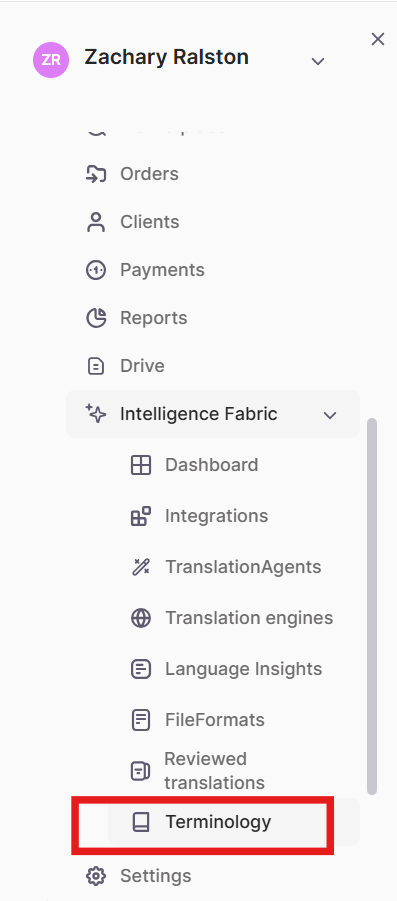
- In the left navigation sidebar, click Intelligence Fabric → Terminology
-
Open the Suggested Terms tab
-
Review pending suggestions and approve or reject each one
Automatic approval of suggested terms
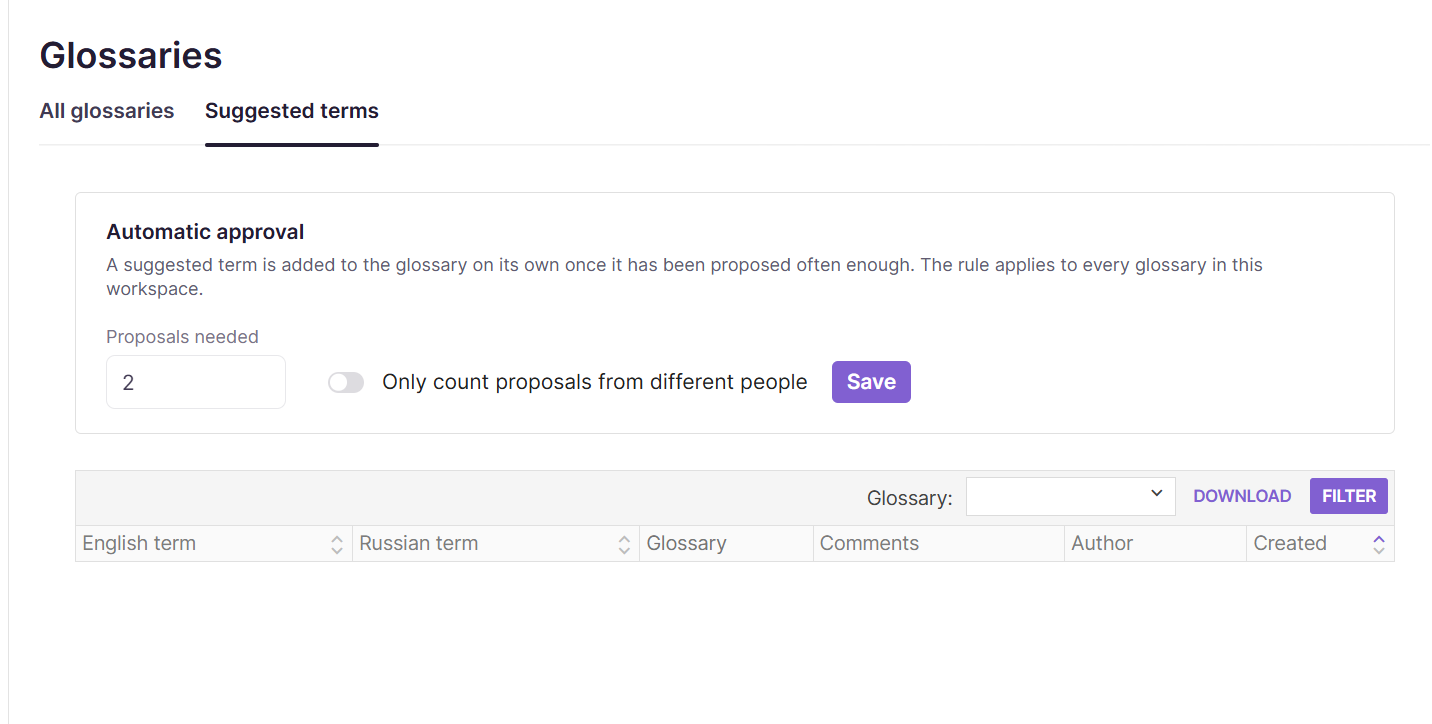
You can configure Smartcat to automatically approve a glossary term. When a user or users suggest a term, or Smartcat suggests a term based on your edits in the CAT editor a number of times to meet the Proposals needed rule, Smartcat automatically adds the term to the glossary. This can help build out the workspace glossaries while preventing a backlog of unapproved terms.
-
Navigate to the Suggested Terms tab
-
Configure the number (1-20) of proposals required to automatically add a suggested term to the glossary. This rule applies to every glossary in the workspace.
-
Use the Only count proposals from different people toggle if you would like Smartcat to count only proposals from different users. This prevents one user from making the same suggestion multiple times to add a term to the glossary.
-
Click Save
📌 Overpopulating glossaries with terms may degrade translation quality, especially for common words that have multiple meanings or that are used as brand names.
Limitations and Requirements
- The approval workflow does not currently send automatic email notifications to administrators. Administrators should check the Suggested Terms tab regularly or establish a team process for flagging pending suggestions.
FAQs
Who can approve or reject a suggested term?
Administrators and project managers can add, edit, approve, and delete terms. You can also create a custom role with glossary permissions scoped to a specific client.
Can a freelancer or in-house linguist add a term directly to the glossary?
No — they can only suggest a term for review. It appears in the Suggested Terms tab and must be approved before it becomes active in the glossary.
Where do I find suggested terms waiting for approval?
In the left sidebar, go to Intelligence Fabric → Terminology, then open the Suggested Terms tab within Linguistic Assets.
Will I get notified when a linguist suggests a new term?
No — the workflow does not currently send automatic email notifications. Check the Suggested Terms tab regularly or set up a team process for it.
Do suggested terms expire if nobody reviews them?
No — suggestions can accumulate indefinitely; there's no automatic rejection of stale suggestions. You can configure an automatic approval rule to move suggestions to a glossary to prevent them from building a backlog on the Suggested terms tab.
Want to learn more?
See how Smartcat can transform your localization workflow.
Still need help?
Our support team responds within one business day.