Configuring your Chief of Staff in the Intelligence Fabric
Overview
Your Chief of Staff is the personal AI Coworker in the Intelligence Fabric — the only coworker that belongs to you individually rather than to your whole workspace. During onboarding, your Chief of Staff builds a profile of you: your role, department, the type of content you work with, your communication style, and how much autonomy you want to grant it. Your Chief of Staff shapes how it works with you based on this profile, and keeps its own personal Skills library and personal memory tied to you alone.
You can review your Chief of Staff’s configuration and update them at any time through the Chief of Staff page in the Intelligence Fabric.
When to use it
-
After completing onboarding to double-check or refine what Chief of Staff learned about you
-
When your role, department, or day-to-day content changes
-
When you want to change how much autonomy Chief of Staff has — suggesting next steps versus handling things for you
-
When you want to change your Chief of Staff's display name or avatar
Requirements and limitations
-
Every profile field is optional. Skipping a field during onboarding does not block you from using Chief of Staff
-
Your Chief of Staff profile, its personal Skills, and its personal memory belong to you alone. They are never visible to other users in your workspace, including your workspace admin
How to use it
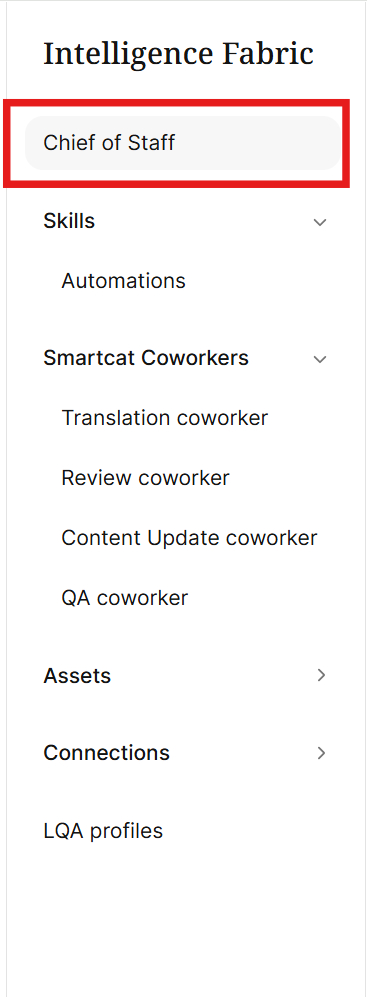
- In the left navigation sidebar, click Intelligence Fabric.

- Click Chief of Staff
Update your identity
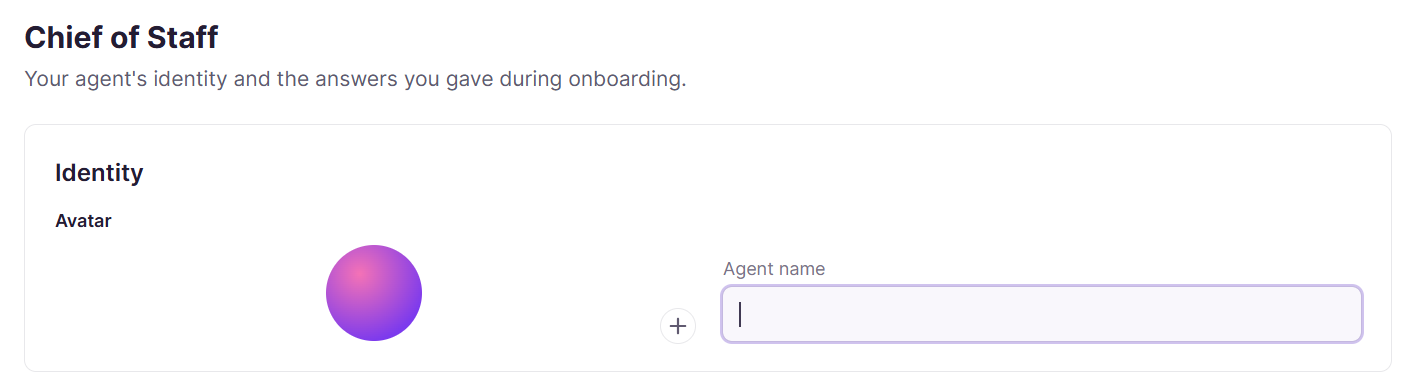
Edit the name and avatar of your chief of staff.
-
Name — a text field where you can enter the name of your Chief of Staff.
-
Avatar — click the image or the + to upload a new image for your Chief of Staff.
Update your profile
Some profile fields are filled in automatically from your onboarding answers. Any field you skip during onboarding stays empty until you fill it in yourself. Your Chief of Staff never re-asks a skipped field on its own. The answers you give in these fields provide context to the Chief of Staff to help it understand your durable preferences for how you work.
On the Chief of Staff page, you can fill in or update any of the following profile fields:
-
How you work — a single-select choice of I work alone, I work with reviewers, or I review others' work. Selecting Other opens a text field where you can provide your own answer.
-
What slows you down — describe the biggest thing that slows you down within your own work and workflows. This helps the Chief of Staff identify places where it can provide additional assistance.
-
Autonomy — select Suggest next steps or Handle things for me. Selecting Other opens a text field where you can provide your own answer. This field helps the determine how it fits within your workflow.
-
Role — describe your work role and how you use Smartcat
-
Which department are you on? — select one of the following options: Learning & Development, HR & People, Marketing, Product, Engineering, Customer Support, Legal & Compliance, Operations, Finance, or Sales. Selecting Other opens a text field where you can provide your own answer.
-
And what kind of content do you work with most? — select any of the content types you work with: Learning content, HR & internal comms, Marketing & creative, Website content, Product documentation, Software UI/UX copy, Customer support content, Technical documentation, Legal & regulated documentation, Financial reports & accounting, and Operational SOPs. Selecting Other opens a text field where you can provide your own answer.
-
Communication style — select Concise, Detailed, Casual, or Formal. This helps the Chief of Staff determine what level of formality to provide in your chats.
-
What do you want to solve with Smartcat? — select one of the following options: Generate content, Create course & training content, Localize for new markets, Keep content automatically up to date, Manage translation projects, Translate content at scale, Improve translation quality, or Automate time-consuming workflows. Selecting Other opens a text field where you can provide your own answer.
Once you’ve updated your Chief of Staff, future replies and task handling reflect your latest answers, for example, using your chosen communication style when it replies, or handling a task outright instead of only suggesting it, depending on your Autonomy setting.
FAQs
What does my Chief of Staff actually know about me?
During onboarding it builds a profile covering your role, department, the type of content you work with, your communication style, and how much autonomy you want to grant it. Every field is optional — skipping one doesn't block you from using Chief of Staff.
Can I change my answers after onboarding is done?
Yes — go to the Chief of Staff page in Intelligence Fabric at any time to update any profile field, including your autonomy setting, communication style, or role.
Will my workspace admin be able to see my Chief of Staff profile or personal skills?
No — your Chief of Staff profile, its personal skills, and its personal memory belong to you alone and are never visible to other users, including your workspace admin.
What does the "Autonomy" setting actually change?
It determines whether your Chief of Staff suggests next steps for you to approve, or handles tasks for you outright — this affects how it responds to requests going forward.
If I skip a profile field during onboarding, will Chief of Staff keep asking me about it?
No — it never re-asks a skipped field on its own. You have to fill it in yourself on the Chief of Staff page when you're ready.
Want to learn more?
See how Smartcat can transform your localization workflow.
Still need help?
Our support team responds within one business day.