Extract and preserve background sound in AI-dubbed videos
Overview
Do you want to retain original background sounds or music in your AI-dubbed videos? The background sound extraction feature lets you preserve background audio while adding AI-generated voices, creating natural-sounding results.
How it works
When you use AI dubbing, Smartcat automatically separates background sounds from the original track. This blends the AI voice seamlessly with the background audio for a professional, immersive final product.
Step-by-step guide
1. Upload your media file
Upload a video or audio file within the Create a project flow (requires the Beta of the Video→Projects integration) or the Translate video, audio, subtitles flow.
2. Select AI dubbing
For the Translate video, audio, subtitles flow:
-
Choose an AI voice for your dubbing
-
The Extract Background Sound option appears automatically after voice selection
-
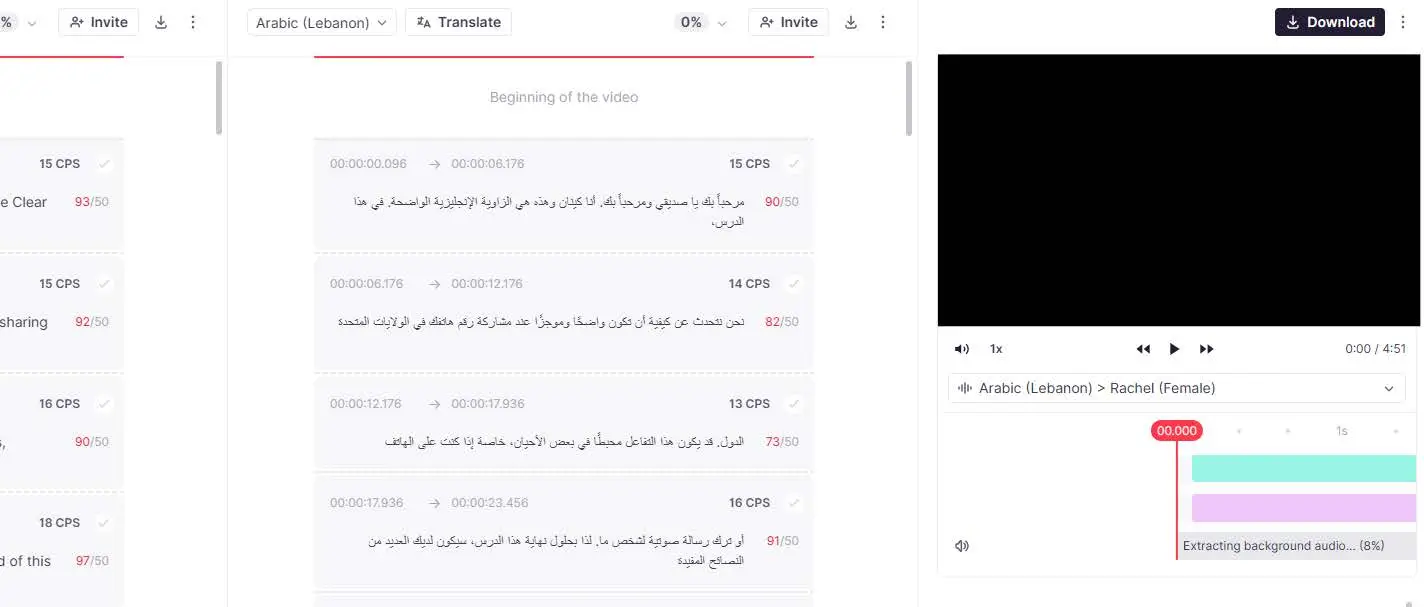
Background sound extraction begins immediately, with a progress indicator visible
For the Create a project flow:
- The Translation review stage automatically starts background sound extraction
📌 Background sound extraction does not block you from translation and review actions.
3. Manage background sound
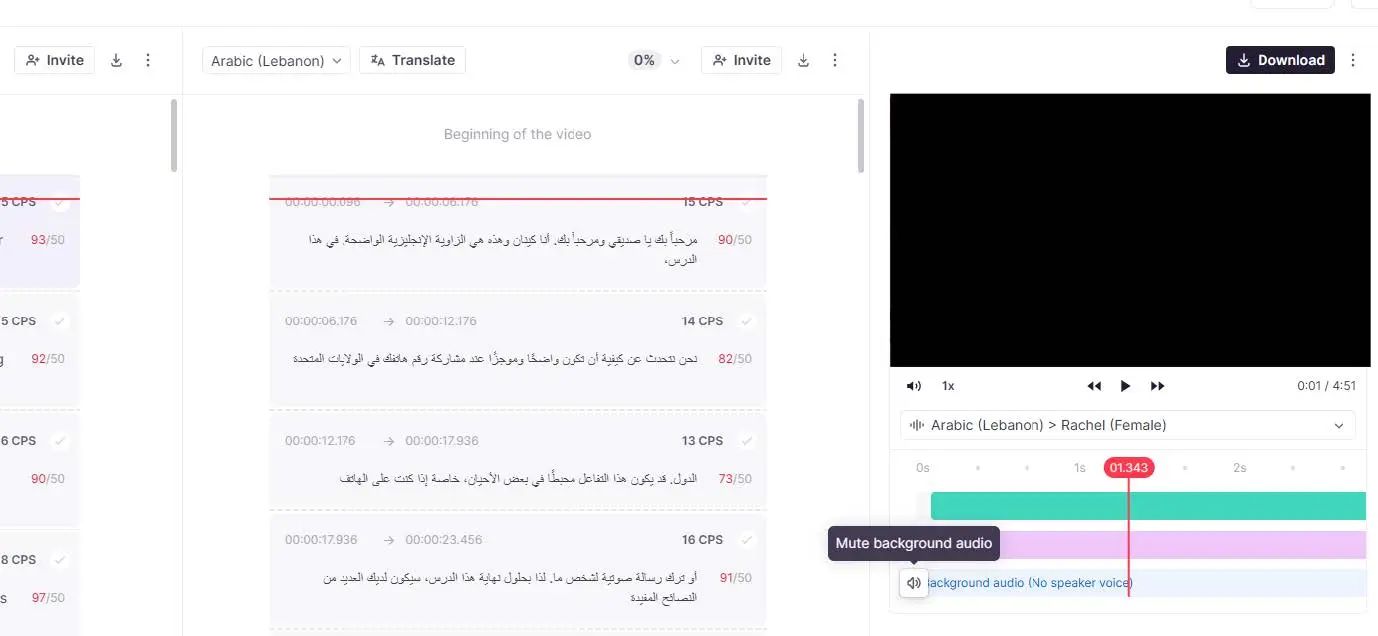
You can turn background sound on or off anytime during the process.
The video preview reflects your selection:
-
If background sound is ON: you hear both the AI voice and the original background audio
-
If background sound is OFF: you hear only the AI voice
-
Your settings carry over to the final exported video
4. Export your dubbed video
Export the video when you are happy with the preview.
-
If background sound is ON, you get the AI voice mixed with background audio
-
If background sound is OFF, you get only the AI voice
Your dubbed video is exported with the audio settings you chose.
Next step: volume control
In future updates, you will be able to adjust the volume of background sounds to fine-tune the balance between the AI voice and the original audio.
Why use this feature?
-
Enhance AI-dubbed videos by maintaining the natural feel of the original media
-
Better user experience for marketing, customer support, and content creation
-
Flexible control over background audio for professional-quality results
Limitations of background sound extraction
While this feature enhances the AI dubbing experience, there are some limitations to be aware of:
-
Quality of separation varies: the effectiveness of voice separation depends on the complexity of the original audio. If the background music is similar in frequency to the voice, complete separation may not be possible
-
Loss of audio fidelity: some background sounds may be partially distorted or removed due to limitations in AI separation models
-
Issues with low-quality audio: noisy recordings or audio with heavy reverb may result in imperfect separation
-
Speech overlapping with music: if the original voice and background sound are highly blended, artifacts may be noticeable in the extracted background track
-
Processing time: extracting background sound may take additional processing time, especially for long videos
-
Multi-speaker challenges: if there are multiple speakers in the original audio, separation accuracy may decrease
FAQs
Can I turn background sound on or off after I've already started dubbing?
Yes — you can toggle background sound on or off at any point during the process, and the video preview updates immediately to reflect your choice. Your final setting carries over to the exported video.
Why does my exported dubbed video still have some of the original noise or music mixed in oddly?
Separation quality depends on the complexity of the original audio. If background music shares a similar frequency range with the voice, complete separation may not be possible, and heavily blended or overlapping speech/music can leave audible artifacts in the extracted background track.
Does background sound extraction slow down my project?
It does not block translation or review actions — extraction runs in the background with a progress indicator, though it can add processing time, especially for longer videos.
Can I adjust the volume of the background sound relative to the AI voice?
Not yet — that's a planned future update. Currently you can only turn background sound fully on or off, not adjust its relative volume.
Does this feature work the same way whether I use the Create a Project flow or the Translate Video/Audio/Subtitles flow?
Mostly, yes, though the trigger differs: in the Translate Video, Audio, Subtitles flow, extraction starts after you select an AI voice; in the Create a Project flow (which requires the Beta Video→Projects integration), extraction starts automatically at the Translation Review stage.
Want to learn more?
See how Smartcat can transform your localization workflow.
Still need help?
Our support team responds within one business day.