AI Translation Overview
Overview
AI translation in Smartcat combines your existing Reviewed Translations (translation memory), best-of-breed machine engines, and built-in quality checks into a single, seamless workflow. The result: faster translations, consistent terminology, and lower review costs.
Why It Matters
Speed: Instantly translate new content by reusing past work (reviewed translations, formerly translation memories) and high-quality AI engines.
Consistency: Always apply your approved terminology from glossaries.
Cost-efficiency: Avoid paying for human review whenever an exact TM match exists and reduce post-edit time.
Six-Step Overview
1. Document Segmentation
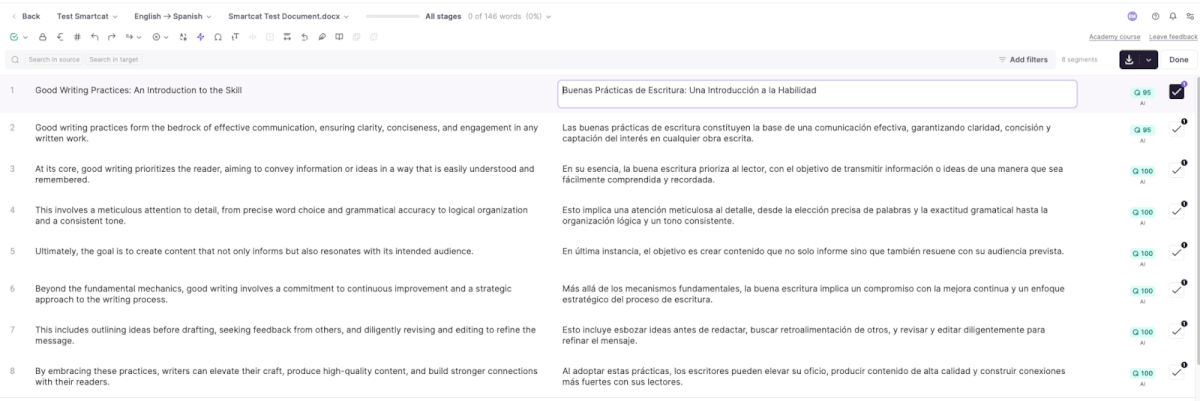
Smartcat first breaks each file into segments (usually one sentence apiece). Every core translation feature — TM lookup, AI translation, QA checks — operates at the segment level. Once AI translation completes, you or a reviewer will open the document in the CAT Editor, where you'll see each segment ready for review.
2. Reviewed Translation Lookup
Each segment is checked against your Reviewed Translations (TMs) for exact matches. When a reviewed translation exists, Smartcat applies it automatically, saving you time and effort in human review. By default, TM matches are confirmed automatically and do not require further review from human; matches will stay out of scope when you assign someone to review the document.
3. Machine Translation (AI Translation)
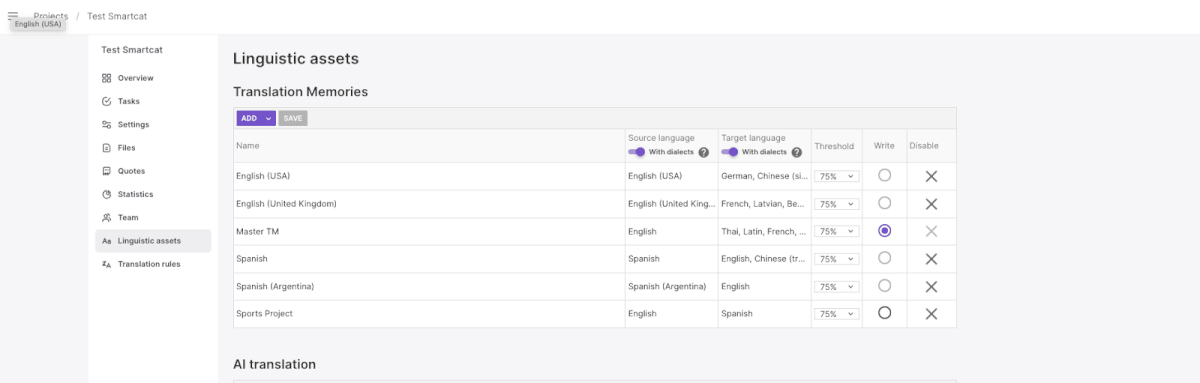
Segments without TM matches go through Smartcat's AI translation routing, which selects the best available AI engine for that language pair. You can override this routing in two places:
-
Project Settings → Linguistic Assets → AI translation
-
AI Translation
4. Quality Checks
After translation, Smartcat runs automatic QA checks to catch issues such as:
-
Missing formatting tags
-
Incorrect numbers
-
Punctuation errors
-
Capital-letter mismatches
-
Target text is significantly shorter/longer than source text
One of the most important checks is for mistranslated glossary terms. If glossary errors are detected, Smartcat adds an extra step to correct them.
5. Glossary-Term Fix
When a QA check flags a glossary-term error (e.g., a preferred term wasn't used), Smartcat triggers an OpenAI-based correction for non-LLM engines. LLM engines are trusted to handle glossary terms correctly, so this fix isn't applied to them.
6. Fallback Translation
If a segment still has critical errors (such as missing formatting or a failed engine response) Smartcat automatically reruns translation using Google NMT as a reliable backup. In the future, you'll be able to choose which fallback engine to use and enable or disable fallback via AI Translation Profiles.
With these six steps, Smartcat ensures your content is translated quickly, accurately, and consistently — leveraging both your past translations and the latest in AI technology. In the next articles, we'll dive deeper into AI translation routing logic, profile settings, and glossary management.
What context the AI translation model receives
AI translation agents in Smartcat receive a fixed, closed set of prompt inputs: the source and target languages, the source text, glossary terms, forbidden terms, and TM fuzzy matches. They do not see the richer per-unit context that a custom LOCJSON file can carry for human linguists — segment comments/instructions, content-type metadata, and reference images are displayed in the editor for translators and reviewers, but are not passed into the AI translation prompt itself (reference images specifically are only linked inside comments and are never visually inspected by the translation step, which is text-only). Character limits are the one exception: rather than being given to the model as context, they're enforced afterward through a length-control mechanism that checks the AI's output and sends it back to be shortened until it fits, with any per-segment limit coming from the file itself taking priority over a profile-wide limit.
Translation is not strictly segment-isolated. Segments are sent to the model in batches sized to fit its context window, so neighboring segments within the same batch are visible to the model together, which generally keeps wording consistent within a batch, though some drift between batches is possible on long documents. The separate AI Review/LQA agents work differently: they process fixed batches of roughly 30 segments, read per-segment revision history and existing comment threads, and receive glossary terms with their Preferred/Allowed/Forbidden status as guidance (though this is contextual instruction to the model, not a hard enforcement rule).
FAQs
What's the order of operations when I run AI translation on a project?
Smartcat segments the document, checks each segment against your Translation Memory for matches, sends anything unmatched through your configured AI engine, runs automated QA checks, and applies a fallback re-translation if a critical error is found.
Will confirmed TM matches be sent to the AI engine again?
No — segments with a confirmed TM match are auto-applied and excluded from further AI translation and human review, which is part of what makes reusing a TM cost- and time-efficient.
What happens if the AI translation makes a glossary error?
For non-LLM engines, an OpenAI-based correction step is automatically triggered to fix glossary-term errors. LLM engines are trusted to apply glossary terms correctly during generation.
Can I control which AI engine handles the translation step?
Yes — engine routing is configurable under Project Settings > Linguistic Assets > AI translation.
What happens if AI translation produces a critical error?
A fallback translation is triggered automatically via Google NMT for that segment. Future versions are expected to allow choosing a custom fallback engine.
Want to learn more?
See how Smartcat can transform your localization workflow.
Still need help?
Our support team responds within one business day.