Reviewer Coworker
Overview
The Reviewer Coworker adds an AI reviewers directly into Smartcat translation workflows. This coworker reviews translated segments, suggests corrections, and confirms segments in the Translation Review stage, working alongside human contributors inside the same workspace.
The Reviewer Coworker helps teams scale translation quality checks and automates parts of the review process while keeping the workflow fully visible inside Smartcat.
What it Does
The Reviewer Coworker reviews translated segments for accuracy and quality, checking whether the translation correctly conveys the meaning of the source text. It makes changes to fix meaning drift or mistranslations, unnatural phrasing or awkward constructions, incorrect terminology, inconsistent style or register, and grammar and spelling errors. If a translation is already accurate and natural, it leaves the segment unchanged; when it does make corrections, it preserves the original intent and provides brief comments explaining the changes, written in the same language as the translation itself.
For terminology, the agent is glossary-aware: for each segment it receives the glossary terms matched in the source text along with their status (Preferred, Allowed, or Forbidden), and its instructions direct it to use Preferred terms, never output Forbidden ones, and flag the issue in a comment either way. The agent does not edit or comment on segments that are locked or excluded from editing; it only marks them as confirmed, which counts toward progress. When editing requires reordering words (e.g., for languages like Japanese), it may move tags, but must preserve correct tag pairing and nesting throughout. By design, the Reviewer only begins work once the preceding stage (such as AI Translation) has been marked completed, not merely reached 100% progress.
When to Use It
The Reviewer Coworker is useful when teams want to:
-
Significantly reduce manual review workload while maintaining oversight
-
Ensure translations adhere to linguistic quality, brand guidelines, and compliance requirements
-
Scale review processes across large volumes of content
How It Works
Assign the Reviewer Coworker to a review a task
-
Open the translation project.
-
Create or open a Review stage task.
-
Assign the Reviewer Coworker as a reviewer.
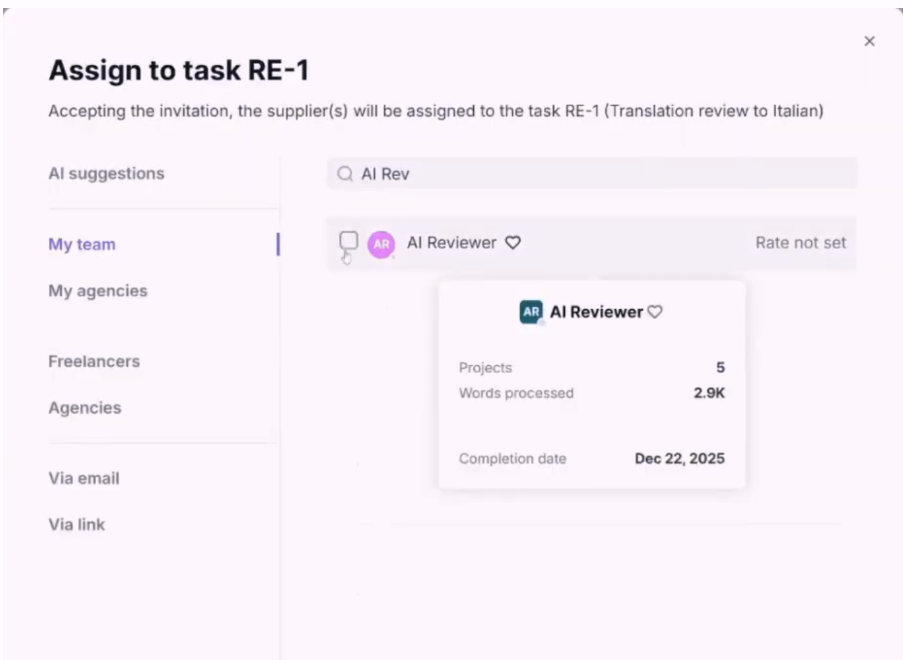
- Send the task invitation.
The coworker accepts the task automatically and begins reviewing segments. The Reviewer Coworker consumes Smartwords as it reviews content.
Monitor the coworker’s work
-
Track review progress in real time as segments are confirmed.
-
Review the coworker’s edits and suggestions directly within the task.
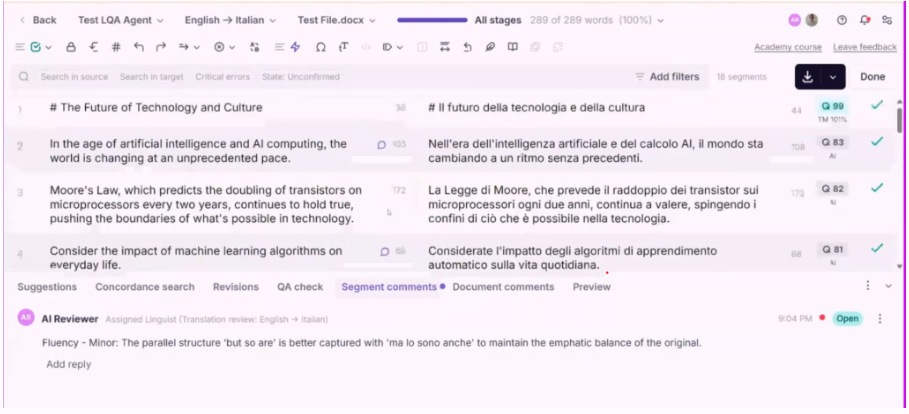
- Open the Revisions tab in the CAT editor to see all changes.
FAQs
Q: Why add the Reviewer Coworker to a workflow?
A: AI Reviewer Agents significantly reduce the time it takes human reviewers to review a translation, identifying the places where the human reviewer can make the most impact.
Q: Can multiple AI Reviewer Agents be added to a workspace?
A: Yes. Multiple agents can be created and assigned to different tasks or review contexts.
Want to learn more?
See how Smartcat can transform your localization workflow.
Still need help?
Our support team responds within one business day.