Use RAG to improve AI translation quality in Smartcat
Overview
Retrieval-Augmented Generation (RAG) enriches your AI translation by fetching relevant segments from your own Translation Memory (TM) and adding them to the prompt. This guides the large language model (LLM) toward more consistent, accurate output.
What is RAG?
Here is a real-life analogy to help you understand how RAG works.
Recipe book with sticky notes: Imagine you are baking a new cake (your source text). You have a recipe book (the LLM), but you also pull out a friend's recipe for a similar cake and stick it in as a reference. Their recipe is not exactly for the same cake, but it has hints (ingredient proportions, baking times, special tips) that help you get it just right. RAG works the same way: it finds partial or fuzzy matches in your TM and uses those human-reviewed translations as "sticky notes" to guide the LLM toward more consistent, accurate output.
How RAG translation works in Smartcat
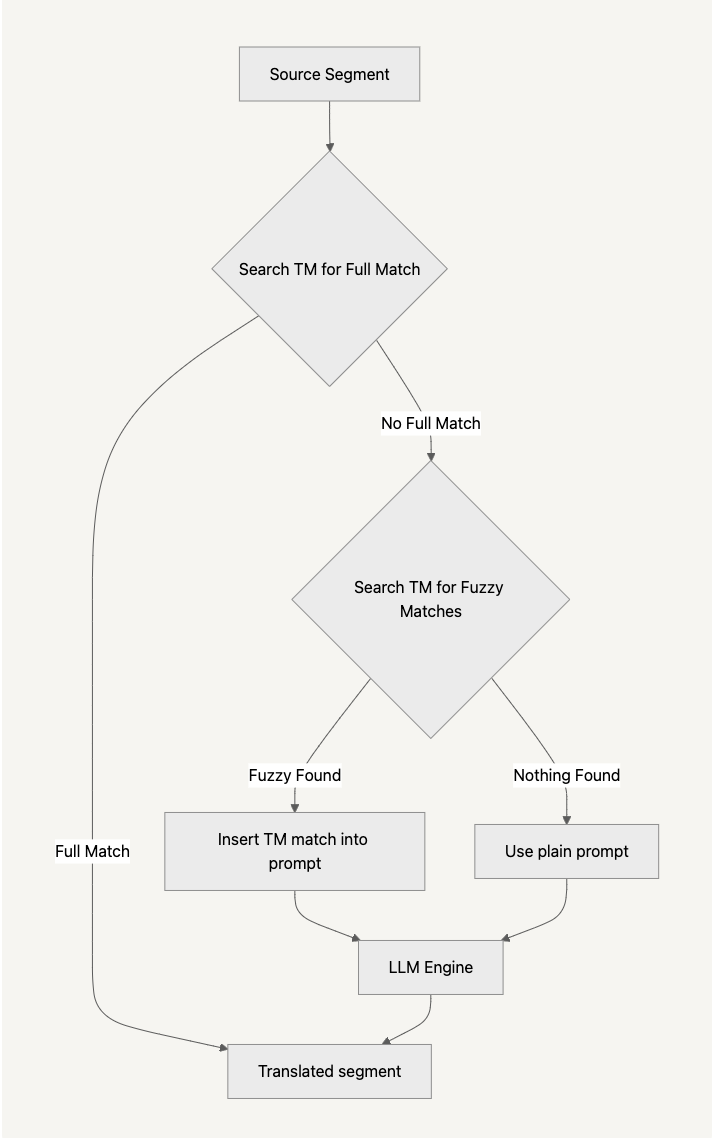
When you run AI translation, Smartcat follows these steps:
-
Search the TM for 100% segment matches
-
If a match is found, insert that exact TM translation into the segment
-
If no match is found, search for all relevant fuzzy matches and insert both the fuzzy source segment and its human-reviewed translation into the prompt
-
If still nothing is found, send the prompt without TM context
Smartcat selects the best available context automatically before sending the prompt to the LLM.
📌 RAG only affects LLM engines. It does not apply to DeepL, ModernMT, Google NMT, Microsoft Translator, or other neural machine translation engines.
Additional details:
-
RAG supports all LLM models available in Smartcat
-
Works with custom prompts in Smartcat
-
Works with TMs that are connected to the project (the same way 100%+ TM matches work)
-
RAG can be disabled if you delete the part of the prompt related to fuzzy match substitution
RAG mini-example
| Source text | Fuzzy match segment | TM translation for match | Raw LLM output | RAG-augmented LLM output |
|---|---|---|---|---|
| International Sales Div. | International Sales Department | División Internacional | División divorciada¹ | División Internacional² |
-
Without RAG, "Div." could be misinterpreted by the LLM ("divorciada" means "divorced")
-
With RAG, Smartcat fetched the TM fuzzy match and its approved translation ("División Internacional"), guiding the LLM to the correct output
Why use RAG
RAG offers advantages over both standalone LLM translation and fine-tuned models:
-
Linguistic consistency and brand voice — retrieved examples from your TM already reflect your approved style, tone, and terminology. By providing concrete, human-reviewed translations, RAG helps the LLM mimic your established voice more faithfully than a standalone or fine-tuned model might.
-
Reduced hallucinations and improved accuracy — instead of generating content from scratch, the LLM uses only the most relevant context pulled from your TM. This targeted retrieval minimizes the risk of off-topic or invented translations and boosts overall quality. Even when no perfect match is available, the model falls back gracefully.
Feature status and enabling
RAG is in private beta and is feature-flagged.
To enable it, contact your customer success manager or Smartcat Support to turn on the flag for your workspace.
FAQs
What does RAG actually do in Smartcat's AI translation?
It retrieves relevant fuzzy or exact matches from your Translation Memory and adds them to the LLM's prompt as reference examples, guiding the model toward more consistent, on-brand output instead of generating a translation from scratch.
Does RAG work with every translation engine?
No — RAG only affects LLM-based engines (currently GPT-4o, Gemini 2.5, and Claude Sonnet 3.7). It does not apply to non-LLM engines like DeepL, ModernMT, Google NMT, or Microsoft Translator.
Do I need to do anything special to get RAG matches, or is it automatic?
It's automatic — Smartcat checks the TM for a 100% match first, then falls back to fuzzy matches inserted into the prompt, and only sends the prompt without TM context if nothing relevant is found.
Is RAG available to everyone right now?
No — it's currently in private beta and feature-flagged. Contact your customer success manager or Smartcat Support to have it enabled for your workspace.
Can I turn RAG off if I don't want it?
Yes — RAG can be disabled by removing the part of the custom prompt related to fuzzy match substitution.
Want to learn more?
See how Smartcat can transform your localization workflow.
Still need help?
Our support team responds within one business day.