Access the Marketplace
Overview
The Marketplace is where clients find and hire freelance linguists.. This article explains where to find the Marketplace in Smartcat and who can access it.
Requirements and Limitations
- The Marketplace is available on client workspaces.
How to access the Marketplace
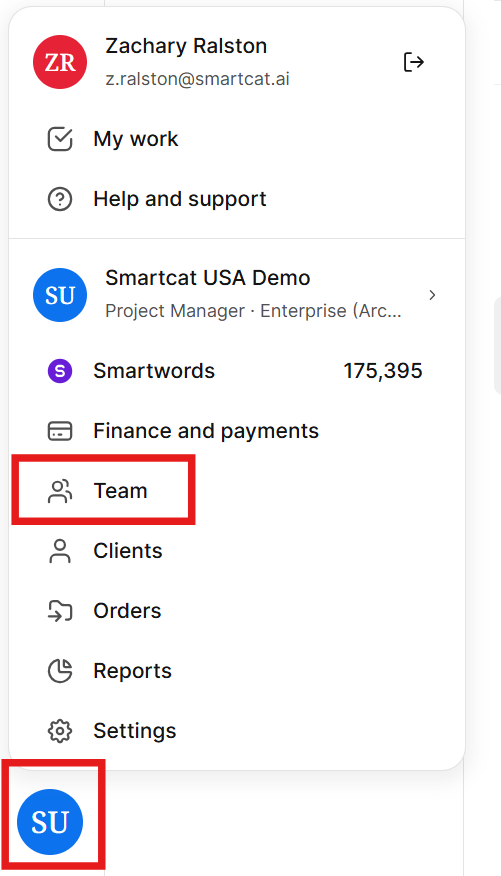
- On your Smartcat home page, click the workspace icon in the lower left corner to bring up the workspace navigation, then click Team.
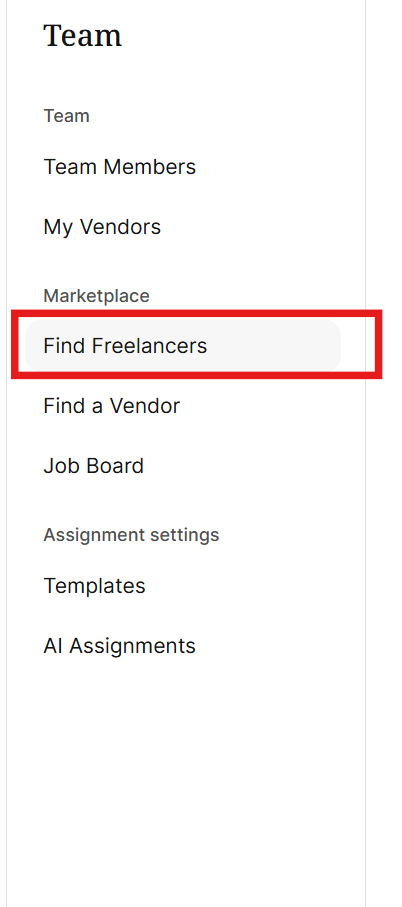
- In the left-hand navigation sidebar, select Find Freelancers to browse the marketplace.
If you don't see a Marketplace option:
-
Confirm you're on a corporate/client workspace, not a freelancer account.
-
Check with your workspace administrator whether your role has permission to view it.
-
If prompted to verify your identity or resolve a billing issue, complete that step — the Marketplace becomes available once resolved.
Once you're in the Marketplace, you can search for and hire linguists, use filters to narrow candidates, and manage vendors. See the related articles below for next steps.
FAQs
Who can access the Marketplace?
The Marketplace is available on client workspaces. If you're on a freelancer account, you use the Marketplace differently — freelancers list their own services rather than searching for other linguists.
Why don't I see a Marketplace option in my workspace?
Confirm you're logged into a corporate/client workspace rather than a freelancer account, and check with your workspace administrator whether your role has permission to view it. If you're prompted to verify your identity or resolve a billing issue, complete that step first — the Marketplace becomes available once resolved.
Where exactly do I click to open the Marketplace?
Click the workspace icon in the lower-left corner to open the workspace navigation, select Team, then choose Find Freelancers in the left-hand sidebar.
What can I do once I'm in the Marketplace?
You can search for and hire linguists, use filters to narrow down candidates, and manage vendors you've already added to your team.
Can I restrict or disable Marketplace access for a workspace?
Marketplace access cannot be turned off by your team directly. It's applied by Smartcat Support as a workspace-level block. To request it, contact Smartcat Support and confirm the workspace you want blocked; once applied, anyone in that workspace who tries to hire or order freelancer services through the Marketplace will see the Blocked status and won't be able to proceed.
For jobs that are already open, unassigned, or in progress on the Marketplace side at the time of the request, our team will need to review them with you individually rather than cancelling them automatically. If a linguist has already started or delivered work, that job may still need to be settled before it's closed.
Want to learn more?
See how Smartcat can transform your localization workflow.
Still need help?
Our support team responds within one business day.