Translating PO files in Smartcat
Translating PO files in Smartcat
Overview
Smartcat supports PO (Portable Object) files, a common localization format used by many software projects and by integrations with platforms such as Figma and Google Docs. PO files are processed as bilingual files: Smartcat extracts both the source string (msgid) and the target string (msgstr, if present). When you export the translated file, the msgstr is updated with the translation from the editor. Smartcat also allows you to upload a .pot template and translate it like a .po file.
Smartcat offers three parsing options for PO files:
-
PO — the default parser.
-
Serge.io PO — the recommended parser for continuous localization, when your file contains string IDs.
-
Monolingual PO — a specialized parser for a narrow set of use cases.
Upload your PO file
-
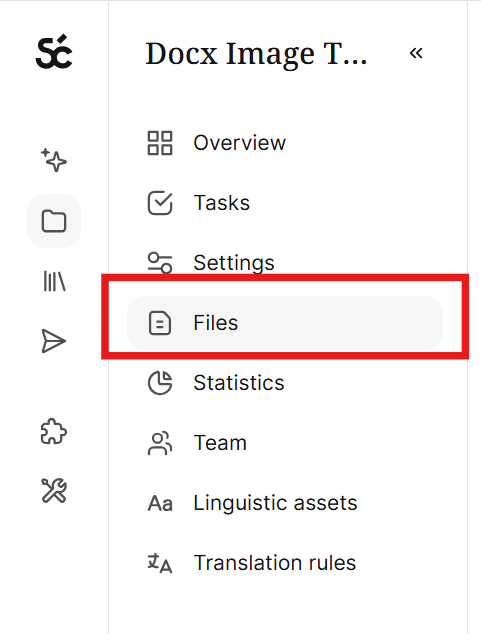
In the left navigation sidebar, click Files.
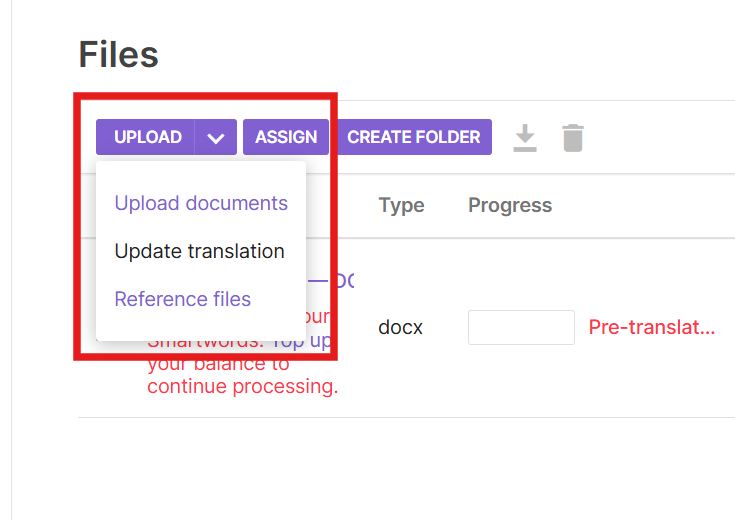
- Click Upload → Upload documents
- Select the PO file you want to upload. This brings up the settings for the PO file.
-
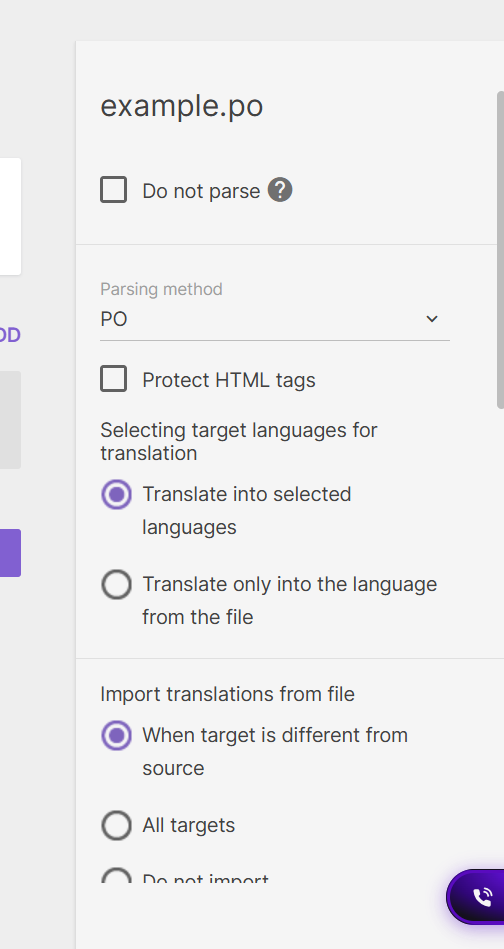
Configure your file settings. The following settings appear in the file panel when you upload a .po or .pot file to an existing project:
-
Do Not Parse — When enabled, Smartcat skips the parser entirely and treats the file as a non-translatable attachment — no segments are created, no Smartwords are counted, and the file won't open in the editor. Leave unchecked to translate the PO file.
-
Parsing Method — see Choosing a parser below
-
Protect HTML tags — turns any HTML tags in the file (such as
<p>,<div>,<b>) into protected tags in the editor. Enable this option if your files contain HTML markup you want preserved in the translated output. -
Selecting target languages for translation — Controls which target language(s) the file is translated into:
-
Selected — translate into the target language(s) you selected for the project.
-
From file — translate only into the language declared in the PO file's own Language: header.
-
-
Import translations from file — Controls whether existing translations (
msgstrvalues) are substituted into the target segments:-
All — always import the translation from the file into each segment.
-
None — ignore the translations in the file and import the source only (segments come in untranslated).
-
-
Confirm translation from file — Controls whether imported translations are automatically confirmed (marked as completed at a workflow stage) rather than left as unconfirmed drafts:
-
None — import translations but leave them unconfirmed.
-
At first stage — confirm imported segments at the first workflow stage (e.g. Translation).
-
At last stage — confirm imported segments at the final workflow stage.
-
By states — confirm based on each segment's status in the source file.
-
-
Lock segments — Controls whether imported segments are locked (protected from further editing):
-
None — do not lock any segments.
-
Confirmed — lock the segments that were confirmed on import.
-
By states — lock segments based on their status in the source file.
-
-
Use placeholders to import variables — When enabled, Smartcat detects variables and placeholders in the strings (e.g. %s, %d, {name}, {0}) and marks them up as protected placeholder tags in the editor, according to the workspace's placeholder preset. This keeps programmatic variables intact so translators cannot alter or delete them, and they are preserved correctly on export.
-
-
Click Finish to upload the document. You can click Save Defaults to use these settings for the same file type going forward.
Choosing a parser
Default PO
The default PO parser processes any standard PO file. It does not use string IDs to track individual segments. As a result, when you re-upload an updated source file, the existing document is replaced entirely: all revisions and comments on that document are removed, and the file is effectively deleted and re-created.
Use the default PO parser when your file does not contain string IDs that can be used as segment keys.
Serge.io PO
The Serge.io PO parser lets you use unique string IDs as keys for each segment. Smartcat expects each string ID to appear as a comment (marked with #:) above the source and target strings.
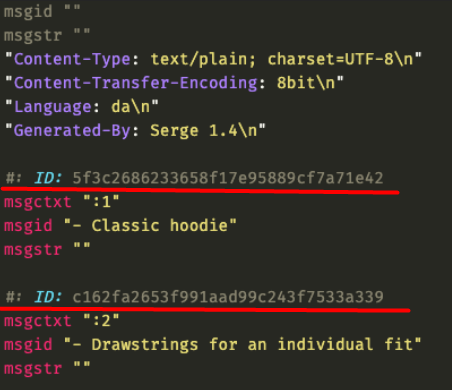
Because each segment has a stable key, Smartcat can update a document segment by segment: only segments whose source text changed are reprocessed, while all other segments — along with their revisions and comments — remain untouched. This also means you only spend Smartwords on the segments that actually changed, rather than re-translating the whole file.
This makes Serge.io PO the recommended choice for continuous software localization. Whenever your PO files contain string IDs (which is the common case), use the Serge.io PO parser.
Both the default PO parser and Serge.io process PO files as bilingual files, which means they extract the source string and the target string, if it is present in the file. The msgid is the source segment, and the msgstr is the target segment. When you export the translated PO file, the msgstr is updated with the translation from the editor. Smartcat also imports the comment for each source string, usually marked with #. in the file.
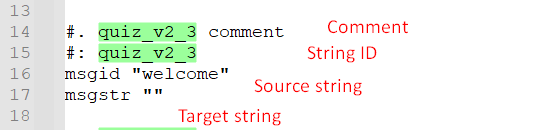
⚠️ If a PO file has no string IDs, it cannot be processed with the Serge.io PO parser and you will see an error. In that case, use the default PO parser instead.
Monolingual PO
The Monolingual PO parser extracts only the target string (msgstr) and does not import the source text into the editor. This does not work for most translation workflows, so only use Monolingual PO for a specific use case that requires it. This parser has no additional settings.
Default PO and Serge.io Import settings
The default PO and Serge.io PO parsers share the same import settings. These are the standard bilingual import settings used for most bilingual formats in Smartcat (such as XLIFF), with the following differences:
-
Protect HTML
-
PO files do not support the Segmentation, Save source file segmentation, or Allow intersecting tags options. All other bilingual import options behave the same way as for XLIFF.
Smartcat also imports the developer comment for each source string. In a PO file, this comment is usually marked with #. and appears in the editor as a segment comment.
Common errors
Duplicate identifiers. This error can occur with the Serge.io PO parser, which requires every string ID to be unique. If your file contains duplicate identifiers, Smartcat will show a duplicate-identifier error and the file will not import. To resolve it, change or remove the duplicate identifier in your source file and upload it again.
FAQs
What happens to my comments and revisions when I re-upload a file?
With Serge.io PO, only changed segments are reprocessed and everything else is preserved. With the default PO parser, re-uploading replaces the whole document, which removes all revisions and comments.
Does re-uploading cost Smartwords for the whole file?
With Serge.io PO, you only spend Smartwords on the segments that actually changed. With the default PO parser, the file is re-created, so the whole file may be reprocessed.
Can you import or export compiled .mo binaries with Smartcat?
No, you must export the translated .po file and compile it with msgfmt or your framework’s build step.
Does Smartcat support plural forms?
Yes, Smartcat supports plural forms using msgid_pluralor msgstr[n]. Plural rules come from the file’s Plural-Forms header.
Does Smartcat support msgctxt markers?
Yes, two entries with the same msgid but different msgctxt values are kept as separate segments with separate translations.
What's the best way to translate content exported from a third-party survey or questionnaire tool?
Most survey platforms (e.g., SurveyMonkey, Qualtrics) let you export your survey text as a PO or CSV file. If your platform offers a PO export, use that — Smartcat processes PO as a bilingual format with the source and target strings held separately, so segmentation, translation memory, and glossary matching all work as expected. If your platform only offers CSV, that also works — just make sure the source and target columns are set correctly in the upload settings, and export the finished file as UTF-8 to avoid corrupting accented or non-Latin characters. Whichever format you use, treat any HTML tags in your survey text as protected inline tags before translating, so they carry through untouched, and re-check tag integrity with QA before exporting back to your survey platform.
Want to learn more?
See how Smartcat can transform your localization workflow.
Still need help?
Our support team responds within one business day.