Install and configure the Smartcat CLI
Overview
The Smartcat CLI is a command-line tool for developers who want to synchronize localization files between a local project and Smartcat. You can import and export files, upload and download source and target files, and run pull and push synchronization steps directly from your terminal.
End-to-End Demo
Binary downloads (latest version)
Download the binary for your platform:
-
Linux (x64): https://smartcat-cli.s3.amazonaws.com/smartcat-linux-x64.zip
-
Linux (musl, x64): https://smartcat-cli.s3.amazonaws.com/smartcat-linux-musl-x64.zip
-
Linux (arm64): https://smartcat-cli.s3.amazonaws.com/smartcat-linux-arm64.zip
-
macOS (x64): https://smartcat-cli.s3.amazonaws.com/smartcat-osx-x64.zip
-
Windows (x64): https://smartcat-cli.s3.amazonaws.com/smartcat-win-x64.zip
General syntax
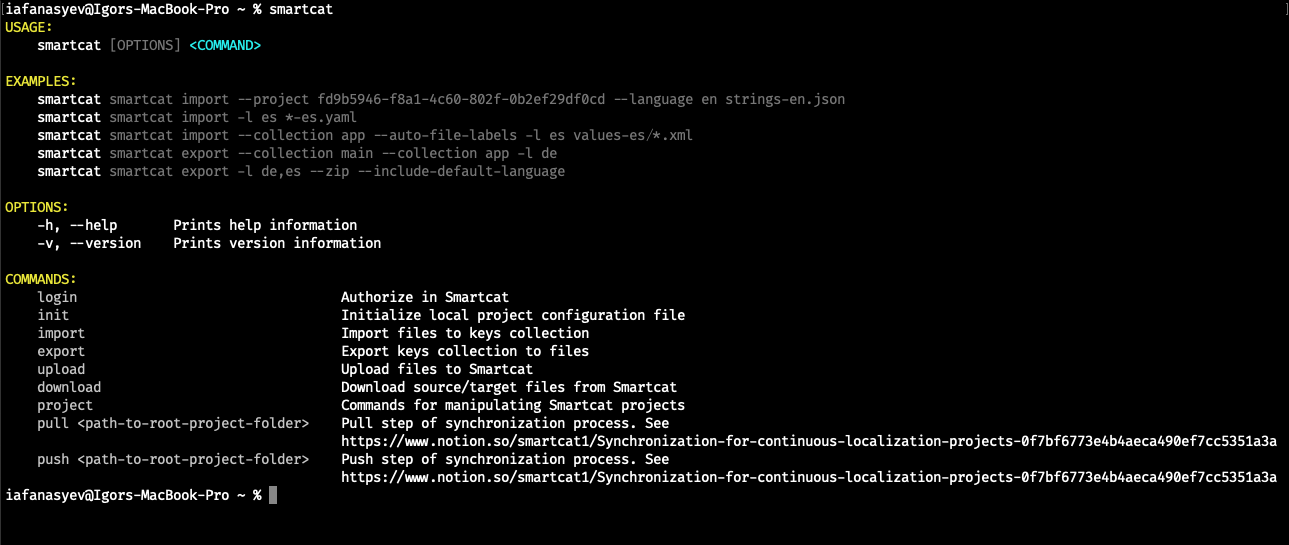
The CLI supports the following commands:
| Command | Details |
|---|---|
| login | Authorize in Smartcat |
| init | Initialize local project configuration file |
| import | Import files to keys collection |
| export | Export keys collection to files |
| upload | Upload files to Smartcat |
| download | Download source/target files from Smartcat |
| project | Commands for manipulating Smartcat projects |
| pull | Pull step of synchronization process |
| push | Push step of synchronization process |
The following general options are available:
| Option | Details |
|---|---|
| h, --help | Prints help information |
| v, --version | Prints version information |
Configuration
Smartcat CLI reads configuration from the following sources, in order:
-
Global configuration, stored in
%APP_DATA%/smartcat/config.json -
Local configuration, taken from a file called
.smartcat(orsmartcat.json) in the current directory -
Environment variables
-
Command-line parameters (see the Global CLI options)
Global CLI options
Main options
-
-s|--server— sets the current Smartcat server (optional) -
-w|--workspace— sets the current Smartcat workspace ID (optional) -
-p|--project— sets the current Smartcat project ID (optional) -
-t|--api-token— sets the current Smartcat API token (optional)
Other options
-
-g|--global— ignore local configuration and use the global one (optional) -
-c|--config— specifies the path to the config file (optional)
FAQs
Who is the Smartcat CLI meant for?
Developers who want to synchronize localization files between a local project and Smartcat directly from the terminal — importing/exporting files and running pull/push sync steps without using the web UI.
Where does the CLI read its configuration from, and which source wins if they conflict?
In order: global configuration (%APP_DATA%/smartcat/config.json), then local configuration (a .smartcat or smartcat.json file in the current directory), then environment variables, then command-line parameters — each later source can override the earlier ones.
What's the difference between pull/push and import/export?
import and export move files into and out of a local keys collection, while pull and push are the two steps of the full synchronization process between your local project and Smartcat.
Can I point the CLI at a specific project or workspace without editing a config file?
Yes — use the -p|--project and -w|--workspace command-line options (along with -s|--server and -t|--api-token) to set these directly when running a command.
Is the CLI available for all major operating systems?
Yes — binaries are available for Linux (x64, musl x64, arm64), macOS (x64), and Windows (x64).
Want to learn more?
See how Smartcat can transform your localization workflow.
Still need help?
Our support team responds within one business day.