Supported file formats
Overview
Smartcat supports a wide variety of file formats for translation and localization. When you upload a file, Smartcat detects the format automatically and routes it to the appropriate processing engine.
Drag and drop your files or select them when creating a new project or translation task. If a file format is not supported, an error message appears and the file is not uploaded.
Supported file formats
Microsoft Office
-
DOC / DOCX
-
XLS / XLSX / XLSM
-
PPT / PPTX / PPS / PPSX / POT / POTX
📌 Microsoft Office formats are proprietary and complex. Some post-processing may be required on translated documents.
Open Office
-
ODT
-
ODP
Text and rich text
-
TXT
-
RTF
Data and Spreadsheets
- CSV
Markdown
- MD / MKD / MDWN / MDOWN / MDTXT / MDTEXT / MARKDOWN
Hypertext
-
HTML / HTM
-
PHP
Bilingual interchange formats
-
XLIFF (XLF) 1.2 and 2.0
-
SDLXLIFF
-
MQXLIFF
-
XLIFF files from Articulate Rise 360
-
XLIFF files from Articulate Storyline
-
XLIFF files from Easygenerator
-
PO / POT
-
TTX
Desktop publishing
-
PDF
-
IDML (Adobe InDesign)
-
INX
-
MIF (FrameMaker)
📌 PDF files are processed using OCR. See the Images (OCR) section for supported input formats.
Technical writing
-
DITA XML
-
DITAMAP
-
HELP+MANUAL XML
Localization
-
XML
-
TTML
-
Android XML
-
RESX
-
LOCJSON
-
JSON
-
TJSON
-
YML / YAML
-
INC
-
INX
-
STRINGS (Apple)
-
STRINGSDICT (Apple)
-
XCSTRINGS (Apple Xcode string catalog)
-
PROPERTIES (Java)
Learning content
-
Articulate Rise SCORM course (ZIP)
-
Articulate Storyline course (ZIP)
-
Articulate Storyline native file (STORY)
Video
-
MP4
-
MPEG / MPG / M2V
-
AVI
-
MOV / QT
-
MKV
-
M4V
-
FLV
-
3GP / 3G2
-
OGV
-
TS
-
WMV
-
VOB
Audio
-
MP3
-
MP2 / M2A
-
M4A
-
AAC
-
OGG
-
FLAC
-
WMA
Subtitle
-
SRT
-
VTT
Images (OCR)
The following image and document formats are supported via OCR processing:
-
JPG / JPEG / JFIF
-
TIF / TIFF
-
PNG
-
BMP
-
GIF
-
DCX / PCX
-
JP2 / JPC
-
DJVU / DJV
-
JB2
-
PDF (image-only)
Packages
-
SDLPPX / SDLRPX
-
WSXZ
-
ZIP
📌 ZIP packages are used for IDML, DITA, Articulate Rise SCORM, Articulate Storyline courses, and other packaged content. Smartcat detects the package type automatically.
Unsupported formats
- FM (FrameMaker binary)
Blocked file extensions
To protect against security risks, Smartcat blocks upload of files with the following extensions. These cannot be uploaded regardless of content:
ade, adp, apk, app, appx, appxbundle, asp, aspx, asx, bas, bat, cab, cer, chm, cmd, cnt, com, cpl, crt, csh, der, diagcab, dll, dmg, exe, fxp, gadget, grp, hlp, hpj, hta, htc, inf, ins, iso, isp, its, jar, jnlp, js, jse, ksh, lib, lnk, mad, maf, mag, mam, maq, mar, mas, mat, mau, mav, maw, mcf, mda, mdb, mde, mdt, mdw, mdz, msc, msh, msh1, msh1xml, msh2, msh2xml, mshxml, msi, msix, msixbundle, msp, mst, msu, nsh, ops, osd, pcd, pif, pl, plg, prf, prg, printerexport, ps1, ps1xml, ps2, ps2xml, psc1, psc2, psd1, psdm1, pst, py, pyc, pyo, pyw, pyz, pyzw, reg, scf, scr, sct, sh, shb, shs, sys, theme, tmp, url, vb, vbe, vbp, vbs, vhd, vhdx, vsmacros, vsw, vxd, webpnp, website, ws, wsc, wsf, wsh, xbap, xll, xnk
⚠️ Note: js appears in the blocked extensions list above. If you need to translate JavaScript localization files, export them as JSON or another supported localization format.
Format-specific limitations and best practices
This section addresses common questions about specific file format handling.
Microsoft Office files
| Format | Supported | Known Limitations |
|---|---|---|
| DOCX | ✅ | Complex formatting (nested tables, text boxes) may require post-processing |
| Bilingual DOCX (parallel columns) | ⚠️ Partial | Export only — cannot import edited bilingual DOCX back into Smartcat |
| XLSX | ✅ | Use MultilingualExcel for multi-language files with source/target columns |
| XLSM (macro-enabled) | ✅ | Macros are preserved but not translated |
PowerPoint speaker notes
Speaker notes in PPTX files are not translated by default. To include them, enable the Upload notes (also shown as "Load notes") option in the file's advanced upload settings before adding it to a project:
-
In a project, click Upload → Upload documents
-
Upload your PPTX file
-
In the file settings, enable Load notes to translate speaker notes
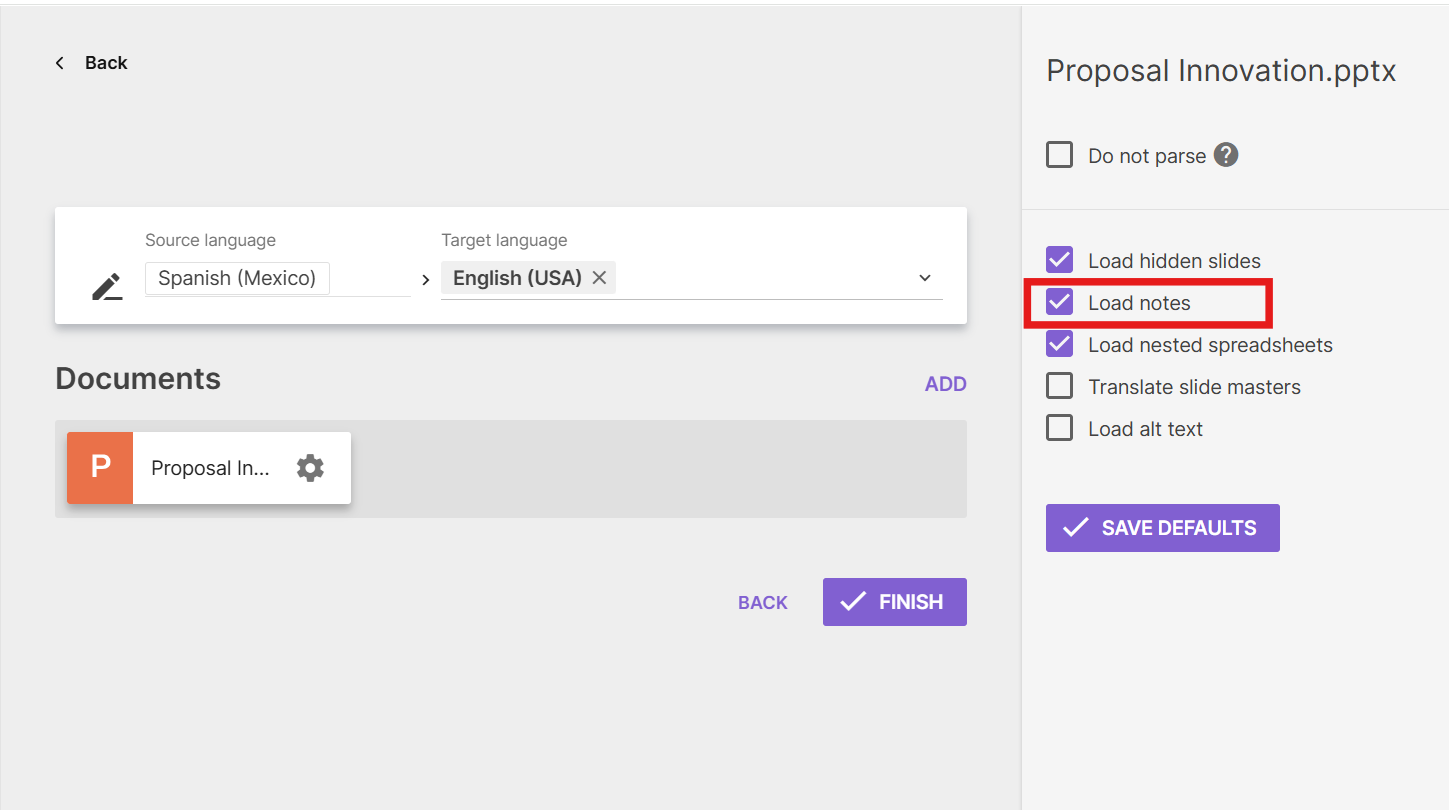
- Click Finish to finish the upload. You can also click Save Defaults to save your settings for the next PPTX file upload.
If notes are left unchecked, they are silently excluded from both translation and the word count, which can be easy to miss until a review catches it
PDF files
| Scenario | Supported | Notes |
|---|---|---|
| Native PDF (text-based) | ✅ | Full support with text extraction |
| Scanned PDF | ✅ | OCR automatically extracts text from scanned pages |
| Image-heavy PDF | ✅ | OCR processes embedded images containing text |
| PDF with complex layouts | ✅ | Layout preservation depends on document complexity |
📌 For best results with scanned PDFs, ensure the source document has clear, high-resolution text.
E-Learning formats
| Format | Supported | Notes |
|---|---|---|
| SCORM 1.2 | ✅ | Full support via Learning Content Agent |
| SCORM 2004 (all editions) | ✅ | Full support via Learning Content Agent |
| Articulate Rise | ✅ | Native support — upload SCORM ZIP package |
| Articulate Storyline | 🟡 On roadmap | Currently on short-term roadmap |
| Articulate Storyline (XLIFF export) | ✅ | Supported via XLIFF file upload |
| Articulate Storyline (.STORY native) | ✅ | Native file support available |
| xAPI (Tin Can) | ❌ | Not currently supported |
Localization formats
| Format | Supported | Notes |
|---|---|---|
| JSON | ✅ | Standard JSON key-value pairs supported |
| JSON (nested objects) | ✅ | Nested structures supported with proper formatting |
| XLIFF 1.2 | ✅ | Full support including translation state attributes |
| XLIFF 2.0 | ✅ | Full support |
| YAML | ✅ | Standard YAML localization files supported |
Desktop publishing
| Format | Supported | Notes |
|---|---|---|
| IDML (InDesign) | ✅ | Original formatting preserved; tag settings available for optimization |
📌 For IDML files, review the tag settings before translation to optimize segment handling. See: https://help.smartcat.com/idml-file-tag-settings/
FAQ — Format-specific questions
Q: Can Smartcat handle bilingual DOCX files with parallel columns?
A: Smartcat can export bilingual DOCX files with parallel source/target columns. However, importing edited bilingual DOCX files back into Smartcat is not currently supported.
Q: Do we support JSON Objects (nested structures)?
A: Yes, JSON files with nested object structures are supported. Ensure your JSON is properly formatted with standard key-value pairs.
Q: What happens with scanned PDFs in the PDF Agent?
A: Scanned PDFs are automatically processed using OCR (Optical Character Recognition) to extract text for translation. For best results, use high-resolution scans with clear text.
Q: Can we translate IDML files without quality degradation?
A: Yes, IDML files preserve original formatting. Use the IDML tag settings to optimize segment handling and simplify text formatting.
Q: Do we support xAPI (not just SCORM)?
A: xAPI (Tin Can) is not currently supported. SCORM 1.2 and SCORM 2004 (all editions) are fully supported.
Q: Can we handle Articulate Storyline audio files?
A: Articulate Storyline native support is on the short-term roadmap. Currently, you can export Storyline content as XLIFF for translation.
Q: Does Smartcat support Adobe Illustrator files?
A: No However, you can still translate Illustrator content by exporting it into one of the following formats first:
- Export as PDF
Export your Illustrator artwork as a PDF, then use:
-
The AI PDF pipeline, which detects and recreates images, logos, icons, and vector diagrams in their original positions.
-
Alternatively, if your exported PDF is vector/graphic-heavy and the standard pipeline struggles, consider the PDF via Image Pipeline (pdfimageonly), recommended for complex layouts.
PDF conversion can break layout fidelity on complex, design-heavy artwork. If your Illustrator file has dense vector graphics or an intricate layout, consider starting with IDML instead of PDF.

- Convert to IDML (if working within an InDesign-adjacent workflow)
IDML/INX is specifically an InDesign format, not a native Illustrator export path — confirm which Adobe application your source file actually comes from before choosing this route.
This is the best option when layout preservation matters most — IDML is fully supported and keeps the original layout intact, which is usually the sticking point with the PDF route on complex artwork.
- Export as PNG/JPG (flattened image)
If the artwork is flattened to a raster image, use Smartcat's AI image translation tools:
-
AI Image Translator — OCR-based: extracts text, removes it from the background, translates it, and reinserts it into the original image.
-
Image Translation 2.0 — newer generative-AI pipeline that preserves original style, fonts, and visual identity; better suited to design-heavy content requiring zero manual adjustments.
This route is best treated as a quick-estimate option rather than a production-ready deliverable. Support has flagged that OCR-based image translation can struggle with complex visual layouts (e.g., dense infographics), where re-exporting as IDML or PPTX gives a better result.
Want to learn more?
See how Smartcat can transform your localization workflow.
Still need help?
Our support team responds within one business day.